Display capture
The display_capture harness is used to verify display driver functionality by capturing and
analyzing display output using a camera. It integrates with pytest to perform automated visual
testing using video fingerprints.
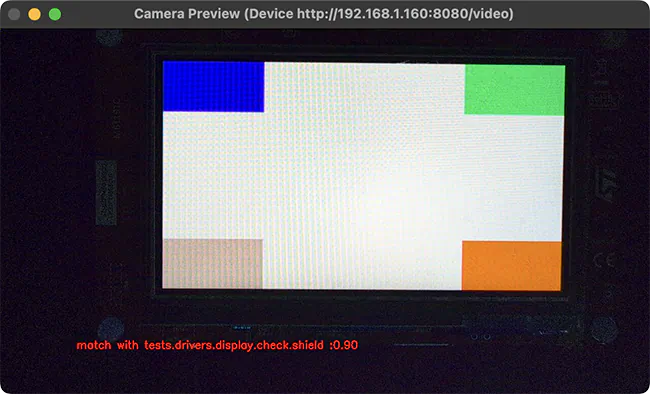
Window being displayed for a “compare” run where fingerprint is a 90% match with the reference.
Hardware setup
The display capture harness requires:
UVC compatible camera with at least 2 megapixels (e.g., 1080p resolution)
Light-blocking enclosure or black curtain to ensure consistent lighting
PC host with camera connection for capturing display output
DUT connected to the same PC for flashing and serial console access
Configuration
The harness uses a YAML configuration file that defines camera settings, test parameters, and video signature analysis options. A typical configuration is shown below:
 case_config:
   device_id: 0
   res_x: 1280
   res_y: 720
   fps: 30
   run_time: 20
 test:
   timeout: 30
   prompt: "screen starts"
   expect: ["tests.drivers.display.check.shield"]
 plugins:
   - name: signature
     module: plugins.signature_plugin
     class: VideoSignaturePlugin
     status: enable
     config:
       operations: "compare"  # or "generate"
       metadata:
         name: "tests.drivers.display.check.shield"
         platform: "frdm_mcxn947"
       directory: "./fingerprints"
       duration: 100
       method: "combined"
       threshold: 0.65
       phash_weight: 0.35
       dhash_weight: 0.25
       histogram_weight: 0.2
       edge_ratio_weight: 0.1
       gradient_hist_weight: 0.1
case_config- This section defines to the general camera settings and duration of the test.device_id- The camera device ID (defaults to 0). Any valid OpenCV camera identifier, which can be:An integer for local cameras (use 0 for the first camera, 1 for the second, etc).
A device path string such as
/dev/video0on Linux.An IP video stream URL such as
rtsp://192.168.1.100:8554/streamfor network cameras.
res_x- The horizontal resolution of the camera (integer, defaults to 1280).res_y- The vertical resolution of the camera (integer, defaults to 720).fps- The frames per second of the camera (integer, defaults to 30).run_time- The duration of the test in seconds (integer, defaults to 20).
test- This section contains the test configuration for device interaction.timeout- Maximum time in seconds to wait for the prompt to appear on the device UART output (integer, defaults to 30).prompt- The string pattern to wait for in the device UART output before starting the display capture. This can be a regular expression (string, defaults touart:~$).expect- A list of expected test result strings that must match the results returned by the application. The test passes if the captured results match this list (list of strings, defaults to['PASS']).
plugins- This section contains the configuration for the plugins processing the camera frames. Only theVideoSignaturePluginplugin is currently supported, and it takes the following configuration options:operations- The operation to perform when running the test (string). Must be set to eithergenerateto capture fingerprints orcompareto compare the captured fingerprints with the reference fingerprints.metadata- Metadata information for fingerprint identification (optional).name- Test case name identifier (string).platform- Target platform identifier (string).
directory- The directory where the fingerprints are stored (string, defaults to./fingerprints).duration- The number of frames to analyze (integer). More frames takes longer but generate more accurate fingerprints).method- The method used to generate display fingerprints (string, defaults tocombined). Must be set to either of the following values:phash,dhash,histogram, orcombined.phash(Perceptual Hash)Captures overall visual structure and layout. Best for detecting major rendering issues, e.g. UI elements being positioned incorrectly.
dhash(Difference Hash)Detects brightness patterns and gradients. Sensitive to contrast changes, e.g. brightness or contrast problems.
histogram(Color Histogram)Analyzes color distribution. Fast at detecting obvious color problems, e.g. color swap bugs.
combined(recommended method)Weights all methods together ( see
method_weightoption below ) for robust comparison. Provides balanced detection of both major and subtle visual issues.
threshold- The similarity score above which it is considered that there is a match between the reference and the captured fingerprints (optional float, defaults to 0.65).phash_weight- The weight for the phash method (optional float, defaults to 0.35)dhash_weight- The weight for the dhash method (optional float, defaults to 0.25)histogram_weight- The weight for the histogram method (optional float, defaults to 0.2)gradient_hist_weight- The weight for the gradient histogram method (optional float, defaults to 0.1)edge_ratio_weight- The weight for the edge ratio method (optional float, defaults to 0.1)
The configuration file path is specified in the test’s testcase.yaml via the
display_capture_config harness configuration option using the DISPLAY_TEST_DIR
environment variable:
harness: display_capture
harness_config:
  pytest_dut_scope: session
  fixture: fixture_display
  display_capture_config: "${DISPLAY_TEST_DIR}/display_config.yaml"
Workflow
First, generate reference fingerprints for a known-good display output:
# Build and flash the display test
west build -b <board> tests/drivers/display/display_check
west flash

# Configure for fingerprint generation mode by setting the 'operations' field to 'generate'
# in the configuration file.

# Generate fingerprints
export DISPLAY_TEST_DIR=<path-to-config-directory>
west twister --device-testing --hardware-map map.yml \
    -T tests/drivers/display/display_check/
Fingerprints are stored in the directory specified in the directory field of the configuration
file, and organized by test name and platform as defined in the metadata field of the
configuration file.
Once the fingerprints have been generated, you can run the test(s) again, this time in comparison mode:
# Set the 'operations' field to 'compare' in the configuration file.

export DISPLAY_TEST_DIR=<path-to-fingerprints-parent-directory>
west twister --device-testing --hardware-map map.yml \
    -T tests/drivers/display/display_check/
The harness compares captured video against reference fingerprints using the configured signature
methods and thresholds. If the similarity score between reference and captured fingerprints exceeds
the configured threshold, the test passes.
Note
The test name in the DUT’s
testcase.yamlmust match thenamefield in the fingerprint’s metadata configuration.Multiple fingerprints can be stored in one directory for comprehensive validation, though this increases comparison time.
Fingerprints are specific to both the test scenario and platform.