Zybo
Digilent Zybo
Overview
The Digilent Zybo (ZYnq BOard) is a feature-rich, ready-to-use embedded software and digital circuit development board. It is built around the Xilinx Zynq-7000 family, which is based on the Xilinx All Programmable System-on-Chip (AP SoC) architecture. This architecture tightly integrates a dual-core ARM Cortex-A9 processor with Xilinx 7-series Field Programmable Gate Array (FPGA) logic.
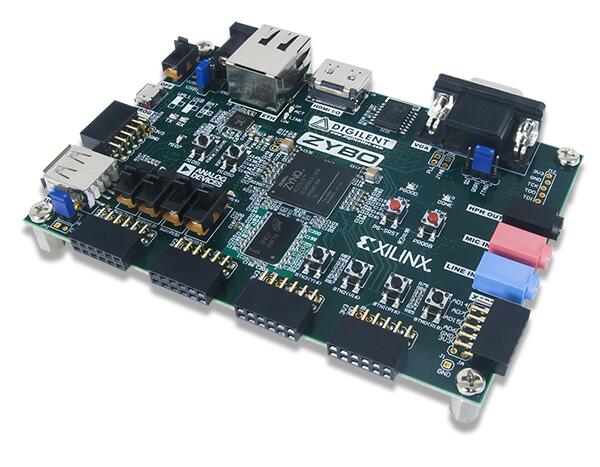
Hardware
Supported Features
The zybo board supports the hardware features listed below.
- on-chip / on-board
- Feature integrated in the SoC / present on the board.
- 2 / 2
-
Number of instances that are enabled / disabled.
Click on the label to see the first instance of this feature in the board/SoC DTS files. -
vnd,foo -
Compatible string for the Devicetree binding matching the feature.
Click on the link to view the binding documentation.
zybo/xc7z010 target
On-target memory for this board target: 512 MiB of RAM, N/A of Flash.
Type |
Location |
Description |
Compatible |
|---|---|---|---|
CPU |
on-board |
ARM Cortex-A9 CPU2 |
|
Clock control |
on-chip |
Generic fixed-rate clock provider1 |
|
Ethernet |
on-chip |
Xilinx GEM Ethernet controller2 |
|
on-chip |
Xilinx GEM MDIO node2 |
||
GPIO & Headers |
on-chip |
Xilinx Zynq-7000/ZynqMP MIO/EMIO GPIO Controller1 |
|
on-chip |
Xilinx Zynq-7000/ZynqMP MIO/EMIO GPIO Controller bank4 |
||
I2C |
on-chip |
Cadence I2C controller2 |
|
Input |
on-board |
Group of GPIO-bound input keys1 |
|
Interrupt controller |
on-chip |
ARM Generic Interrupt Controller v11 |
|
LED |
on-board |
Group of GPIO-controlled LEDs1 |
|
Pin control |
on-chip |
Xilinx Zynq-7000 SoC series pinctrl node1 |
|
SDHC |
on-chip |
Xilinx SD/EMMC host controller2 |
|
Serial controller |
on-chip |
||
SPI |
on-chip |
Cadence SPI controller2 |
|
SRAM |
on-board |
Generic on-chip SRAM1 |
|
System controller |
on-chip |
System Controller Registers R/W1 |
|
Timer |
on-chip |
per-core ARM architected timer1 |
Programming and Debugging
The Zynq-7000 series SoC needs to be initialized prior to running a Zephyr application. This can be
achieved in a number of ways (e.g. using the Xilinx First Stage Boot Loader (FSBL), the Xilinx
Vivado generated ps_init.tcl JTAG script, Das U-Boot Secondary Program Loader (SPL), …).
The instructions here use the U-Boot SPL. For further details and instructions for using Das U-Boot with Xilinx Zynq-7000 series SoCs, see the following documentation:
Building Das U-Boot
Clone and build Das U-Boot for the Digilent Zybo:
git clone -b v2022.04 https://source.denx.de/u-boot/u-boot.git
cd u-boot
make distclean
make xilinx_zynq_virt_defconfig
export PATH=/path/to/zephyr-sdk/arm-zephyr-eabi/bin/:$PATH
export CROSS_COMPILE=arm-zephyr-eabi-
export DEVICE_TREE="zynq-zybo"
make
Flashing
Here is an example for running the Hello World application via JTAG.
Ensure the board is configured for JTAG boot, open a serial terminal, turn on/reset the board (press
the PS-SRST button), and initialize the Zynq-7000 series SoC by uploading and running the U-Boot
SPL via JTAG.
Next, upload and run the Zephyr application:
# From the root of the zephyr repository
west build -b zybo samples/hello_world
west flash
You should see the following message in the terminal:
*** Booting Zephyr OS vx.xx.x-xxx-gxxxxxxxxxxxx ***
Hello World! zybo
Another option is to load and run the Hello World application via U-Boot. Copy
u-boot/spl/boot.bin, u-boot/u-boot.img, and zephyr/zephyr.bin to a FAT32 formatted
microSD card, insert the card in the SD MICRO slot on the Zybo board, ensure the board is
configured for SD boot, and turn on the board.
Once U-boot is done initializing, load an run the Zephyr application:
Zynq> fatload mmc 0 0x0 zephyr.bin
817120 bytes read in 56 ms (13.9 MiB/s)
Zynq> go 0x0
## Starting application at 0x00000000 ...
*** Booting Zephyr OS vx.xx.x-xxx-gxxxxxxxxxxxx ***
Hello World! zybo
Debugging
Here is an example for the Hello World application.
Ensure the board is configured for JTAG boot, open a serial terminal, turn on/reset the board (press
the PS-SRST button), and initialize the Zynq-7000 series SoC by uploading and running the U-Boot
SPL via JTAG.
Next, upload and debug the Zephyr application:
# From the root of the zephyr repository
west build -b zybo samples/hello_world
west debug
Step through the application in your debugger, and you should see the following message in the terminal:
*** Booting Zephyr OS vx.x.x-xxx-gxxxxxxxxxxxx ***
Hello World! zybo