EVK-BMD-330: BMD-330-EVAL
u-blox EVK-BMD-330: BMD-330-EVAL
Overview
The BMD-330-EVAL hardware provides support for the u-blox BMD-330 Bluetooth 5 module, based on The Nordic Semiconductor nRF52810 ARM Cortex-M4 CPU and the following devices:
ADC
CLOCK
FLASH
GPIO
I2C
MPU
NVIC
PWM
RADIO (Bluetooth Low Energy)
RTC
Segger RTT (RTT Console)
SPI
UART
WDT

Note
The BMD-330-EVAL shares the same pin headers and assignments as the BMD-300-EVAL. The BMD-300-EVAL is shown here.
More information about the BMD-330-EVAL and the BMD-330 module can be found at the u-blox website [1]. All of the Nordic Semiconductor examples for the nRF52 DK (nrf52dk_nrf52810) may be used without modification.
Hardware
The BMD-330 on the BMD-330-EVAL contains an internal high-frequency oscillator at 32MHz. There is also a low frequency (slow) oscillator of 32.768kHz. The BMD-330 itself does not include the slow crystal; however, the BMD-330-EVAL does.
Note
When targeting a custom design without a slow crystal, be sure to modify code to utilize the internal RC oscillator for the slow clock.
Supported Features
The ubx_bmd330eval board supports the hardware features listed below.
- on-chip / on-board
- Feature integrated in the SoC / present on the board.
- 2 / 2
-
Number of instances that are enabled / disabled.
Click on the label to see the first instance of this feature in the board/SoC DTS files. -
vnd,foo -
Compatible string for the Devicetree binding matching the feature.
Click on the link to view the binding documentation.
ubx_bmd330eval/nrf52810 target
On-target memory for this board target: 24 KiB of RAM, 192 KiB of Flash.
Type |
Location |
Description |
Compatible |
|---|---|---|---|
CPU |
on-chip |
ARM Cortex-M4 CPU1 |
|
ADC |
on-chip |
Nordic Semiconductor nRF family SAADC node1 |
|
on-board |
ADC channels exposed on Arduino Uno (R3) headers1 |
||
ARM architecture |
on-chip |
Nordic UICR (User Information Configuration Registers)1 |
|
on-chip |
Nordic nRF family BPROT (Block Protection)1 |
||
on-chip |
Nordic EGU (Event Generator Unit)2 |
||
on-chip |
Nordic nRF family SWI (Software Interrupt)4 |
||
Audio |
on-chip |
Nordic PDM (Pulse Density Modulation interface)1 |
|
Clock control |
on-chip |
Nordic nRF clock control node1 |
|
on-chip |
Nordic nRF HFCLK clock control node1 |
||
on-chip |
Nordic nRF LFCLK clock control node1 |
||
on-chip |
Nordic nRF high-frequency crystal oscillator (nRF52 series)1 |
||
Comparator |
on-chip |
Nordic nRF COMP (analog COMParator)1 |
|
Counter |
on-chip |
Nordic nRF timer node3 |
|
Cryptographic accelerator |
on-chip |
Nordic ECB (AES electronic codebook mode encryption)1 |
|
on-chip |
Nordic nRF family CCM (AES CCM mode encryption)1 |
||
Debug |
on-chip |
ARMv7 instrumentation trace macrocell1 |
|
Flash controller |
on-chip |
Nordic NVMC (Non-Volatile Memory Controller)1 |
|
GPIO & Headers |
on-chip |
NRF5 GPIOTE1 |
|
on-chip |
NRF5 GPIO1 |
||
on-board |
GPIO pins exposed on Arduino Uno (R3) headers1 |
||
I2C |
on-chip |
Nordic nRF family TWI (TWI master)1 |
|
Input |
on-board |
Group of GPIO-bound input keys1 |
|
Interrupt controller |
on-chip |
ARMv7-M NVIC (Nested Vectored Interrupt Controller)1 |
|
LED |
on-board |
Group of GPIO-controlled LEDs1 |
|
on-board |
Group of PWM-controlled LEDs1 |
||
Miscellaneous |
on-chip |
Nordic FICR (Factory Information Configuration Registers)1 |
|
on-chip |
Nordic nRF family PPI (Programmable Peripheral Interconnect)1 |
||
MTD |
on-chip |
Flash node1 |
|
Networking |
on-chip |
Nordic nRF family RADIO peripheral1 |
|
Pin control |
on-chip |
Nordic nRF family Pin Controller1 |
|
Power management |
on-chip |
Nordic nRF power control node1 |
|
PWM |
on-chip |
nRF PWM1 |
|
on-chip |
nRFx S/W PWM1 |
||
Regulator |
on-chip |
Nordic nRF5X regulator (fixed stage of the core supply)1 |
|
Retained memory |
on-chip |
Nordic GPREGRET (General Purpose Register Retention) device2 |
|
RNG |
on-chip |
Nordic nRF family RNG (Random Number Generator)1 |
|
RTC |
on-chip |
Nordic nRF RTC (Real-Time Counter)2 |
|
Sensors |
on-chip |
Nordic nRF family TEMP node1 |
|
on-chip |
Nordic nRF quadrature decoder (QDEC) node1 |
||
Serial controller |
on-chip |
Nordic nRF family UARTE (UART with EasyDMA)1 |
|
SPI |
on-chip |
Nordic nRF family SPI (SPI controller)1 |
|
SRAM |
on-chip |
Generic on-chip SRAM1 |
|
Timer |
on-chip |
ARMv7-M System Tick1 |
|
Watchdog |
on-chip |
Nordic nRF family WDT (Watchdog Timer)1 |
Connections and IOs
LED
LED1 (red) = P0.17
LED2 (red) = P0.18
LED3 (green) = P0.19
LED4 (green) = P0.20
D5 (red) = OB LED 1
D6 (green) = OB LED 2
External Connectors
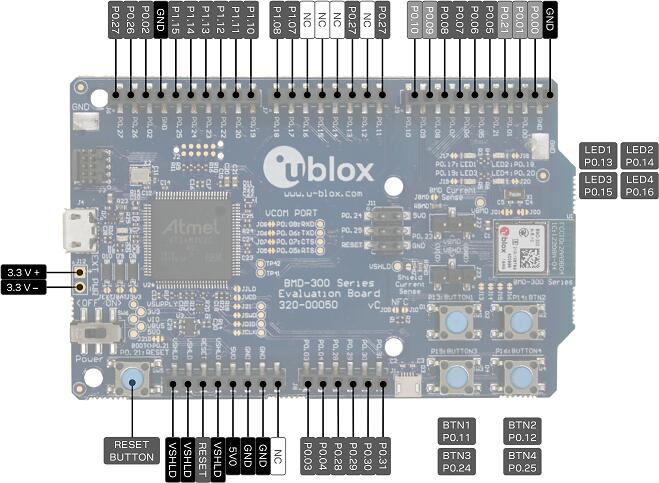
Note
The BMD-330-EVAL shares the same pin headers and assignments as the BMD-300-EVAL. The BMD-300-EVAL is shown here.
Note
The pin numbers noted below are referenced to the pin 1 markings on the BMD-330-EVAL for each header
J-Link Prog Connector (J2)
PIN # |
Signal Name |
|---|---|
1 |
VDD |
2 |
IMCU_TMSS |
3 |
GND |
4 |
IMCU_TCKS |
5 |
V5V |
6 |
IMCU_TDOS |
7 |
Cut off |
8 |
IMCU_TDIS |
9 |
Cut off |
10 |
IMCU_RESET |
Debug OUT (J3)
PIN # |
Signal Name |
|---|---|
1 |
EXT_VTG |
2 |
EXT_SWDIO |
3 |
GND |
4 |
EXT_SWDCLK |
5 |
GND |
6 |
EXT_SWO |
7 |
N/C |
8 |
N/C |
9 |
EXT_GND_DETECT |
10 |
EXT_RESET |
Auxiliary (J9)
PIN # |
Signal Name |
|---|---|
1 |
P0.10 |
2 |
P0.09 |
3 |
P0.08 |
4 |
P0.07 |
5 |
P0.06 |
6 |
P0.05 / AIN3 |
7 |
P0.21 / RESET |
8 |
P0.01 / XL2 |
9 |
P0.00 / XL1 |
10 |
GND |
Arduino Headers
Power (J5)
PIN # |
Signal Name |
BMD-330 Functions |
|---|---|---|
1 |
VSHLD |
N/A |
2 |
VSHLD |
N/A |
3 |
RESET |
P0.21 / RESET |
4 |
VSHLD |
N/A |
5 |
V5V |
N/A |
6 |
GND |
N/A |
7 |
GND |
N/A |
8 |
N/C |
N/A |
Analog in (J8)
PIN # |
Signal Name |
BMD-330 Functions |
|---|---|---|
1 |
A0 |
P0.03 / AIN1 |
2 |
A1 |
P0.04 / AIN2 |
3 |
A2 |
P0.28 / AIN4 |
4 |
A3 |
P0.29 / AIN5 |
5 |
A4 |
P0.30 / AIN6 |
6 |
A5 |
P0.31 / AIN7 |
Digital I/O (J7)
PIN # |
Signal Name |
BMD-330 Functions |
|---|---|---|
1 |
D7 |
P0.18 |
2 |
D6 |
P0.17 |
3 |
D5 |
P0.16 |
4 |
D4 |
P0.15 |
5 |
D3 |
P0.14 |
6 |
D2 |
P0.13 |
7 |
D1 (TX) |
P0.12 |
8 |
D0 (RX) |
P0.11 |
Digital I/O (J6)
PIN # |
Signal Name |
BMD-330 Functions |
|---|---|---|
1 |
SCL |
P0.27 |
2 |
SDA |
P0.26 |
3 |
AREF |
P0.02 / AIN0 |
4 |
GND |
N/A |
5 |
D13 (SCK) |
P0.25 |
6 |
D12 (MISO) |
P0.24 |
7 |
D11 (MOSI) |
P0.23 |
8 |
D10 (SS) |
P0.22 |
9 |
D9 |
P0.20 |
10 |
D8 |
P0.19 |
J11
PIN # |
Signal Name |
BMD-330 Functions |
|---|---|---|
1 |
D12 (MISO) |
P0.24 |
2 |
V5V |
N/A |
3 |
D13 (SCK) |
P0.25 |
4 |
D11 (MOSI) |
P0.23 |
5 |
RESET |
N/A |
6 |
N/A |
N/A |
Programming and Debugging
Flashing
Follow the instructions in the Nordic nRF5x Segger J-Link page to install and configure all the necessary software. Further information can be found in Flashing. Then build and flash applications as usual (see Building an Application and Run an Application for more details).
Here is an example for the Hello World application.
First, run your favorite terminal program to listen for output.
$ minicom -D <tty_device> -b 115200
Replace <tty_device> with the port where the
BMD-330-EVAL can be found. For example, under Linux,
/dev/ttyACM0.
Then build and flash the application in the usual way.
# From the root of the zephyr repository
west build -b ubx_bmd330eval/nrf52810 samples/hello_world
west flash
Debugging
Refer to the Nordic nRF5x Segger J-Link page to learn about debugging u-blox boards with a Segger J-LINK-OB IC.