Nitrogen
96Boards Nitrogen
Overview
The 96Boards Nitrogen hardware provides support for the Nordic Semiconductor nRF52832 ARM Cortex-M4F CPU.
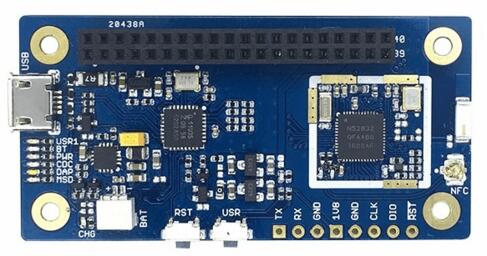
More information about the board can be found at the seeed BLE Nitrogen website. The Nordic Semiconductor Infocenter contains the processor’s information and the datasheet.
Hardware
96Boards Nitrogen provides the following hardware components:
nRF52832 microcontroller with 512kB Flash, 64kB RAM
ARM® 32-bit Cortex®-M4 CPU with FPU
Bluetooth LE
NFC
LPC11U35 on board SWD debugger
SWD debugger firmware
USB to UART
Drag and Drop firmware upgrade
7 LEDs
USR1, BT, PWR, CDC, DAP, MSD, Battery charge
SWD debug connectors
nRF52832 SWD connector
nRF52832 Uart connector
On board chip antenna
1.8V work voltage
2x20pin 2.0mm pitch Low speed connector
Supported Features
The 96b_nitrogen board supports the hardware features listed below.
- on-chip / on-board
- Feature integrated in the SoC / present on the board.
- 2 / 2
-
Number of instances that are enabled / disabled.
Click on the label to see the first instance of this feature in the board/SoC DTS files. -
vnd,foo -
Compatible string for the Devicetree binding matching the feature.
Click on the link to view the binding documentation.
96b_nitrogen/nrf52832 target
On-target memory for this board target: 64 KiB of RAM, 512 KiB of Flash.
Type |
Location |
Description |
Compatible |
|---|---|---|---|
CPU |
on-chip |
ARM Cortex-M4F CPU1 |
|
ADC |
on-chip |
Nordic Semiconductor nRF family SAADC node1 |
|
ARM architecture |
on-chip |
Nordic UICR (User Information Configuration Registers)1 |
|
on-chip |
Nordic nRF family BPROT (Block Protection)1 |
||
on-chip |
Nordic EGU (Event Generator Unit)6 |
||
on-chip |
Nordic nRF family MWU (Memory Watch Unit)1 |
||
Audio |
on-chip |
Nordic PDM (Pulse Density Modulation interface)1 |
|
Clock control |
on-chip |
Nordic nRF clock control node1 |
|
on-chip |
Nordic nRF HFCLK clock control node1 |
||
on-chip |
Nordic nRF LFCLK clock control node1 |
||
on-chip |
Nordic nRF high-frequency crystal oscillator (nRF52 series)1 |
||
Comparator |
on-chip |
Nordic nRF COMP (analog COMParator)1 |
|
Counter |
on-chip |
Nordic nRF timer node5 |
|
Cryptographic accelerator |
on-chip |
Nordic ECB (AES electronic codebook mode encryption)1 |
|
on-chip |
Nordic nRF family CCM (AES CCM mode encryption)1 |
||
Debug |
on-chip |
ARMv7 instrumentation trace macrocell1 |
|
Flash controller |
on-chip |
Nordic NVMC (Non-Volatile Memory Controller)1 |
|
GPIO & Headers |
on-chip |
NRF5 GPIOTE1 |
|
on-chip |
NRF5 GPIO1 |
||
on-board |
GPIO Pin exposed on the 96Boards 1.8v low-speed header1 |
||
I2C |
on-chip |
Nordic nRF family TWI (TWI master)1 |
|
on-chip |
Nordic nRF family TWIM (TWI master with EasyDMA)1 |
||
I2S |
on-chip |
Nordic I2S (Inter-IC sound interface)1 |
|
Input |
on-board |
Group of GPIO-bound input keys1 |
|
Interrupt controller |
on-chip |
ARMv7-M NVIC (Nested Vectored Interrupt Controller)1 |
|
LED |
on-board |
Group of GPIO-controlled LEDs1 |
|
Miscellaneous |
on-chip |
Nordic FICR (Factory Information Configuration Registers)1 |
|
on-chip |
Nordic nRF family PPI (Programmable Peripheral Interconnect)1 |
||
MTD |
on-chip |
Flash node1 |
|
Networking |
on-chip |
Nordic nRF family RADIO peripheral1 |
|
on-chip |
Nordic nRF family NFCT (Near Field Communication Tag)1 |
||
Pin control |
on-chip |
Nordic nRF family Pin Controller1 |
|
Power management |
on-chip |
Nordic nRF power control node1 |
|
PWM |
on-chip |
nRF PWM3 |
|
on-chip |
nRFx S/W PWM1 |
||
Regulator |
on-chip |
Nordic nRF5X regulator (fixed stage of the core supply)1 |
|
Retained memory |
on-chip |
Nordic GPREGRET (General Purpose Register Retention) device2 |
|
RNG |
on-chip |
Nordic nRF family RNG (Random Number Generator)1 |
|
RTC |
on-chip |
Nordic nRF RTC (Real-Time Counter)3 |
|
Sensors |
on-chip |
Nordic nRF family TEMP node1 |
|
on-chip |
Nordic nRF quadrature decoder (QDEC) node1 |
||
Serial controller |
on-chip |
Nordic nRF family UART1 |
|
SPI |
on-chip |
||
SRAM |
on-chip |
Generic on-chip SRAM1 |
|
Timer |
on-chip |
ARMv7-M System Tick1 |
|
Watchdog |
on-chip |
Nordic nRF family WDT (Watchdog Timer)1 |
Pin Mapping
LED
LED1 / User LED (green) = P0.29
LED2 / BT LED (blue) = P0.28
External Connectors
Low Speed Header
PIN # |
Signal Name |
nRF52832 Functions |
|---|---|---|
1 |
GND |
GND |
3 |
UART CTS |
P.014 / TRACEDATA[3] |
5 |
UART TX |
P0.13 |
7 |
UART RX |
P0.15 / TRACEDATA[2] |
9 |
UART RTS |
P0.12 |
11 |
UART TX |
P0.13 |
13 |
UART RX |
P0.15 / TRACEDATA[2] |
15 |
P0.22 |
P0.22 |
17 |
P0.20 |
P0.20 |
19 |
N/A |
N/A |
21 |
N/A |
N/A |
23 |
P0.02 |
P0.02 |
25 |
P0.04 |
P0.04 |
27 |
P0.06 |
P0.06 |
29 |
P0.08 |
P0.08 |
31 |
P0.16 |
P0.16 |
33 |
P0.18 |
P0.18 |
35 |
VCC |
|
37 |
USB5V |
|
39 |
GND |
GND |
PIN # |
Signal Name |
nRF52832 Functions |
|---|---|---|
2 |
GND |
GND |
4 |
PWR BTN |
|
6 |
RST BTN |
P0.21 / RESET |
8 |
P0.26 |
P0.26 |
10 |
P0.25 |
P0.25 |
12 |
P0.24 |
P0.24 |
14 |
P0.23 |
P0.23 |
16 |
N/A |
N/A |
18 |
N/A |
PC7 |
20 |
N/A |
PC9 |
22 |
N/A |
PB8 |
24 |
P0.03 |
P0.03 |
26 |
P0.05 |
P0.05 |
28 |
P0.07 |
P0.07 |
30 |
P0.11 |
P0.11 |
32 |
P0.17 |
P0.17 |
34 |
P0.19 |
P0.19 |
36 |
NC |
|
38 |
NC |
|
40 |
GND |
GND |
More detailed information about the connectors can be found in 96Boards IE Specification.
System Clock
nRF52 has two external oscillators. The frequency of the slow clock is 32.768 kHz. The frequency of the main clock is 32 MHz.
Serial Port
96Boards Nitrogen has one UART, which is used as Zephyr console. Default settings is 115200 8N1.
I2C
96Boards Nitrogen has one I2C. The default I2C mapping for Zephyr is:
I2C0_SCL : P0.22
I2C0_SDA : P0.20
SPI
96Boards Nitrogen has one SPI. The default SPI mapping for Zephyr is:
SPI0_NSS : P0.24
SPI0_SCK : P0.26
SPI0_MISO : P0.25
SPI0_MOSI : P0.23
Flashing Zephyr onto 96Boards Nitrogen
The 96Boards Nitrogen board can be flashed via the CMSIS DAP interface, which is provided by the micro USB interface to the LPC11U35 chip.
Using the CMSIS-DAP interface, the board can be flashed via the USB storage interface (drag-and-drop) and also via pyOCD.
To use pyOCD, install the pyOCD Debug Host Tools and make sure they
are in your search path.
Common Errors
No connected boards
If you don’t use sudo when invoking pyocd-flashtool, you might get any of the following errors:
No available boards are connected
No connected boards
Error: There is no board connected.
To fix the permission issue, simply add the following udev rule for the NXP LPC1768 interface:
$ echo 'ATTR{idProduct}=="0204", ATTR{idVendor}=="0d28", MODE="0666", GROUP="plugdev"' > /etc/udev/rules.d/50-cmsis-dap.rules
Finally, unplug and plug the board again.
ValueError: The device has no langid
As described by pyOCD issue 259, you might get the
ValueError: The device has no langid error when not running
pyOCD as root (e.g. sudo).
To fix the above error, add the udev rule shown in the previous section and install a more recent version of pyOCD.
Flashing an Application to 96Boards Nitrogen
Here is an example for the Hello World application. This requires installing the pyOCD Debug Host Tools.
# From the root of the zephyr repository
west build -b 96b_nitrogen samples/hello_world
west flash
Run your favorite terminal program to listen for output.
$ minicom -D <tty_device> -b 115200
Replace <tty_device> with the port where the board 96Boards Nitrogen
can be found. For example, under Linux, /dev/ttyACM0.
The -b option sets baud rate ignoring the value from config.
Press the Reset button and you should see the following message in your terminal:
Hello World! arm
Debugging with GDB
You can debug an application in the usual way. Here is an example for the Hello World application. This also requires pyOCD.
# From the root of the zephyr repository
west build -b 96b_nitrogen samples/hello_world
west debug