WisTrio
96Boards WisTrio
Overview
96Boards WisTrio LoRa Tracker board is based on the RAK Wireless RAK5205 chipset integrating SX1276 LoRaWAN Modem, STM32L151CB-A MCU and GPS module. Zephyr applications use the 96b_wistrio configuration to run on these boards.
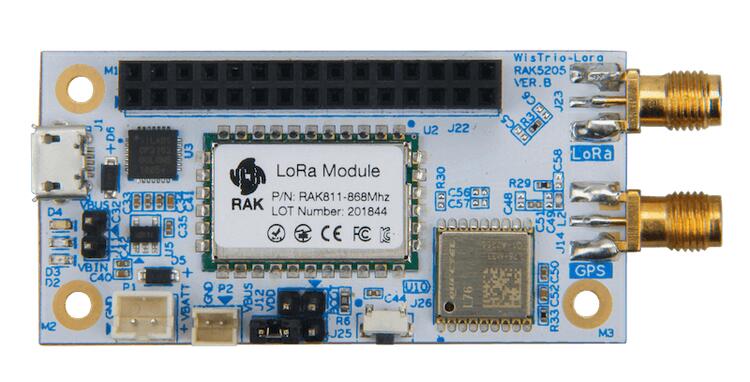
This board is one of the 96Boards IoT Edition [5] platforms providing LoRa connectivity.
Hardware
96Boards WisTrio provides the following hardware components:
RAK5205 Chipset
3.3V work voltage
128 KB Flash
16 KB SRAM
On board sensors:
Accelerometer: STMicro LIS3DH
Integrated Environmental sensor: Bosch BME680
2 User LEDs
GPIO with external interrupt capability
UART (2)
I2C (1)
GPS Module
GPS Antenna
LoRa Antenna
Supported Features
The 96b_wistrio board supports the hardware features listed below.
- on-chip / on-board
- Feature integrated in the SoC / present on the board.
- 2 / 2
-
Number of instances that are enabled / disabled.
Click on the label to see the first instance of this feature in the board/SoC DTS files. -
vnd,foo -
Compatible string for the Devicetree binding matching the feature.
Click on the link to view the binding documentation.
96b_wistrio/stm32l151xba target
On-target memory for this board target: 32 KiB of RAM, 128 KiB of Flash.
Type |
Location |
Description |
Compatible |
|---|---|---|---|
CPU |
on-chip |
ARM Cortex-M3 CPU1 |
|
ADC |
on-chip |
STM32F4 ADC1 |
|
Clock control |
on-chip |
STM32 RCC (Reset and Clock controller)1 |
|
on-chip |
STM32 HSE Clock1 |
||
on-chip |
|||
on-chip |
STM32L0/L1 Multi Speed Internal Clock1 |
||
on-chip |
STM32L0/L1 Main PLL1 |
||
Counter |
on-chip |
STM32 counters8 |
|
DAC |
on-chip |
STM32 family DAC1 |
|
DMA |
on-chip |
STM32 DMA controller (V2bis) for the stm32F0, stm32F1 and stm32L1 soc families1 |
|
Flash controller |
on-chip |
STM32 Family flash controller1 |
|
GPIO & Headers |
on-chip |
STM32 GPIO Controller6 |
|
on-board |
GPIO Pin exposed on the 96Boards 3.3v low-speed header1 |
||
I2C |
on-chip |
||
Interrupt controller |
on-chip |
ARMv7-M NVIC (Nested Vectored Interrupt Controller)1 |
|
on-chip |
STM32 External Interrupt Controller1 |
||
LED |
on-board |
Group of GPIO-controlled LEDs1 |
|
LoRa |
on-board |
Semtech SX1276 LoRa Modem1 |
|
Memory controller |
on-chip |
STM32 Battery Backed RAM1 |
|
Miscellaneous |
on-board |
Qorvo’s RFSW8001 is a single pole triple throw (SP3T) RF switch1 |
|
MTD |
on-chip |
STM32F4 flash memory1 |
|
on-chip |
STM32 on-chip EEPROM1 |
||
NVMEM |
on-chip |
Fixed layout for Non-Volatile memory1 |
|
OTP memory |
on-chip |
STM32 embedded NVM OTP1 |
|
PHY |
on-chip |
This binding is to be used by all the usb transceivers which are built-in with USB IP1 |
|
Pin control |
on-chip |
STM32 Pin controller1 |
|
Power management |
on-chip |
STM32 power controller1 |
|
on-chip |
STM32F1-like wake-up pins controller1 |
||
PWM |
on-chip |
STM32 PWM6 |
|
Regulator |
on-board |
Fixed voltage regulators1 |
|
Reset controller |
on-chip |
STM32 Reset and Clock Control (RCC) Controller1 |
|
RTC |
on-chip |
STM32 RTC1 |
|
Sensors |
on-board |
STMicroelectronics LIS3DH 3-axis accelerometer1 |
|
on-chip |
STM32 quadrature decoder3 |
||
on-chip |
STM32 family TEMP node for production calibrated sensors with two calibration temperatures1 |
||
on-chip |
STM32 VREF+1 |
||
Serial controller |
on-chip |
||
on-chip |
STM32 UART2 |
||
SMbus |
on-chip |
STM32 SMBus controller2 |
|
SPI |
on-chip |
||
Timer |
on-chip |
ARMv7-M System Tick1 |
|
on-chip |
STM32 timers8 |
||
USB |
on-chip |
STM32 USB controller1 |
|
Watchdog |
on-chip |
STM32 watchdog1 |
|
on-chip |
STM32 system window watchdog1 |
Connections and IOs
LED
LED1 / User1 LED = PA12
LED2 / User2 LED = PB4
Serial Port
96Boards WisTrio board has 2 UARTs. Zephyr console output is assigned to USART1 with 115200 8N1 as the default setting and USART3 is used for GPS module.
I2C
96Boards WisTrio board has 1 I2C connected to on-board sensors. The default I2C mapping is:
I2C1_SCL : PB8
I2C1_SDA : PB9
I2C1 also goes to the J22 connector and can be used to attach external sensors.
SPI
96Boards WisTrio board has 1 SPI connected to on-chip LoRa Radio. The default SPI mapping is:
SPI1_SCLK : PA5
SPI1_MISO : PA6
SPI1_MOSI : PA7
SPI1_NSS : PB0
Programming and Debugging
Flashing
96Boards WisTrio can be flashed by two methods, one using the ROM bootloader and another using the SWD debug port (which requires additional hardware).
Flashing using the ROM bootloader requires a special activation pattern, which can be triggered by using the BOOT0 pin. The ROM bootloader supports flashing via UART, and I2C but this document describes the UART case only. You can read more about how to enable and use the ROM bootloader by checking the application note AN2606 [1] .
Using ROM bootloader:
Connect 96Boards WisTrio to your Linux PC using, USB-Micro to USB-A cable.
ROM bootloader can be triggered by the following pattern:
Connect BOOT0 to VDD (link pin 1 and 2 on J12)
Press and release the RST button
More detailed information on activating the ROM bootloader can be found in Chapter 29 of Application note AN2606 [1]. The ROM bootloader supports flashing via UART, and I2C protocols.
Here is an example for building and flashing the Hello World application using stm32flash [2] command line utility:
# From the root of the zephyr repository
west build -b 96b_wistrio samples/hello_world
west flash
Using SWD debugger:
Use the Black Magic Debug Probe [3] as an SWD programmer, which can be connected to the SWD pins exposed on the J22 header using its flying leads and its 20 Pin JTAG Adapter Board Kit. When plugged into your host PC, the Black Magic Debug Probe enumerates as a USB serial device as documented on its Getting started page [4].
It also uses the GDB binary provided with the Zephyr SDK,
arm-zephyr-eabi-gdb. Other GDB binaries, such as the GDB from GCC
ARM Embedded, can be used as well.
$ arm-zephyr-eabi-gdb -q zephyr.elf
(gdb) target extended-remote /dev/ttyACM0
Remote debugging using /dev/ttyACM0
(gdb) monitor swdp_scan
Target voltage: 3.3V
Available Targets:
No. Att Driver
Debugging
After flashing 96Boards WisTrio, it can be debugged using the same GDB instance. To reattach, just follow the same steps above, till “attach 1”. You can then debug as usual with GDB. In particular, type “run” at the GDB prompt to restart the program you’ve flashed.