Argonkey
96Boards Argonkey
Overview
96Boards Argonkey board is based on the ST Microelectronics STM32F412CG Cortex M4 CPU.
This board acts as a sensor hub platform for all 96Boards compliant family products. It can also be used as a standalone board.
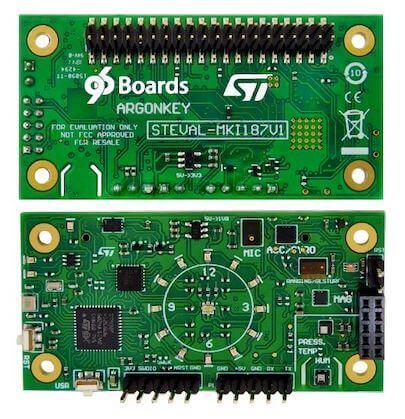
Hardware
96Boards Argonkey provides the following hardware components:
STM32F412CG in UFQFPN48 package
ARM® 32-bit Cortex®-M4 CPU with FPU
100 MHz max CPU frequency
1.8V work voltage
1024 KB Flash
256 KB SRAM
On board sensors:
Humidity: STMicro HTS221
Temperature/Pressure: STMicro LPS22HB
ALS: Intersil ISL29034
Proximity: STMicro VL53L0X
Accelerometer/Gyroscope: STMicro LSM6DSL
Geomagnetic: STMicro LIS2MDL
AMR Hall sensor: MRMS501A
Microphone: STMicro MP34DT05
2 User LEDs
16 General purpose LEDs
GPIO with external interrupt capability
UART
I2C (3)
SPI (1)
I2S (1)
Supported Features
The 96b_argonkey board supports the hardware features listed below.
- on-chip / on-board
- Feature integrated in the SoC / present on the board.
- 2 / 2
-
Number of instances that are enabled / disabled.
Click on the label to see the first instance of this feature in the board/SoC DTS files. -
vnd,foo -
Compatible string for the Devicetree binding matching the feature.
Click on the link to view the binding documentation.
96b_argonkey/stm32f412cx target
On-target memory for this board target: 256 KiB of RAM, 1 MiB of Flash.
Type |
Location |
Description |
Compatible |
|---|---|---|---|
CPU |
on-chip |
ARM Cortex-M4F CPU1 |
|
ADC |
on-chip |
STM32F4 ADC1 |
|
Audio |
on-board |
STMicroelectronics MPXXDTYY digital PDM microphone family1 |
|
CAN |
on-chip |
STM32 CAN controller2 |
|
Clock control |
on-chip |
STM32F4 RCC (Reset and Clock controller)1 |
|
on-chip |
STM32 HSE Clock1 |
||
on-chip |
|||
on-chip |
PLL node binding for STM32F2, STM32F4 and STM32F7 device2 |
||
on-chip |
STM32 Clock multiplexer1 |
||
on-chip |
STM32 Microcontroller Clock Output (MCO)2 |
||
Counter |
on-chip |
STM32 counters14 |
|
DMA |
on-chip |
||
Flash controller |
on-chip |
STM32 Family flash controller1 |
|
GPIO & Headers |
on-chip |
STM32 GPIO Controller8 |
|
I2C |
on-chip |
STM32 I2C V1 controller3 |
|
I2S |
on-chip |
||
Input |
on-board |
Group of GPIO-bound input keys1 |
|
Interrupt controller |
on-chip |
ARMv7-M NVIC (Nested Vectored Interrupt Controller)1 |
|
on-chip |
STM32 External Interrupt Controller1 |
||
LED |
on-board |
TI LP3943 LED1 |
|
on-board |
Group of GPIO-controlled LEDs1 |
||
Memory controller |
on-chip |
STM32 Battery Backed RAM1 |
|
MTD |
on-chip |
STM32F4 flash memory1 |
|
NVMEM |
on-chip |
Fixed layout for Non-Volatile memory1 |
|
OTP memory |
on-chip |
||
PHY |
on-chip |
This binding is to be used by all the usb transceivers which are built-in with USB IP1 |
|
Pin control |
on-chip |
STM32 Pin controller1 |
|
Power management |
on-chip |
STM32 power controller1 |
|
on-chip |
STM32F1-like wake-up pins controller1 |
||
PWM |
on-chip |
STM32 PWM12 |
|
QSPI |
on-chip |
STM32 QSPI Controller1 |
|
Reset controller |
on-chip |
STM32 Reset and Clock Control (RCC) Controller1 |
|
RNG |
on-chip |
STM32 Random Number Generator1 |
|
RTC |
on-chip |
STM32 RTC1 |
|
SDHC |
on-chip |
STM32 SDMMC Host Controller1 |
|
Sensors |
on-board |
STMicroelectronics HTS221 humidity and temperature sensor on I2C bus1 |
|
on-board |
STMicroelectronics LPS22HB pressure sensor1 |
||
on-board |
STMicroelectronics VL53L0X Time of Flight sensor1 |
||
on-chip |
STM32 quadrature decoder6 |
||
on-board |
STMicroelectronics LSM6DSL 6-axis accelerometer and gyrometer accessed through I2C bus1 |
||
on-chip |
STM32 family TEMP node for production calibrated sensors with two calibration temperatures1 |
||
on-chip |
STM32 VREF+1 |
||
on-chip |
STM32 VBAT1 |
||
Serial controller |
on-chip |
||
SMbus |
on-chip |
STM32 SMBus controller3 |
|
SPI |
on-chip |
||
Timer |
on-chip |
ARMv7-M System Tick1 |
|
on-chip |
STM32 timers14 |
||
USB |
on-chip |
STM32 OTGFS controller1 |
|
Watchdog |
on-chip |
STM32 watchdog1 |
|
on-chip |
STM32 system window watchdog1 |
Connections and IOs
LED
LED1 / User1 LED = PB2
LED2 / User2 LED = PC13
System Clock
96Boards Argonkey can be driven by an internal oscillator as well as the main PLL clock. In default board configuration, the 16MHz external oscillator is used to drive the main PLL clock to generate a System Clock (SYSCLK) at 84MHz. On the bus side, AHB clock runs at 84MHz, while APB1/APB2 clock runs at 42MHz.
Serial Port
On 96Boards Argonkey, Zephyr console output is assigned to USART1. Default settings are 115200 8N1.
I2C
96Boards Argonkey board has up to 3 I2Cs. The default I2C mapping is:
I2C1_SCL : PB6
I2C1_SDA : PB7
I2C2_SCL : PB10
I2C2_SDA : PB9
I2C3_SCL : PA8
I2C3_SCL : PB4
I2C3 goes to the P2 connector and can be used to attach external sensors. It goes to 100Kbit maximum.
SPI
96Boards Argonkey board has 2 SPIs. SPI1 is used in slave mode as the communication bus with the AP. SPI2 is used in master mode to control the LSM6DSL sensor. The default SPI mapping is:
SPI1_NSS : PA4
SPI1_SCK : PA5
SPI1_MISO : PA6
SPI1_MOSI : PA7
SPI2_NSS : PB12
SPI2_SCK : PB13
SPI2_MISO : PB14
SPI2_MOSI : PB15
Programming and Debugging
Building
Here is an example for building the Hello World application.
# From the root of the zephyr repository
west build -b 96b_argonkey samples/hello_world
Flashing
96Boards Argonkey can be flashed by two methods, one using the ROM bootloader and another using the SWD debug port (which requires additional hardware).
Flashing using the ROM bootloader requires a special activation pattern, which can be triggered by using the BOOT0 pin. The ROM bootloader supports flashing via USB (DFU), UART, I2C and SPI, but this document describes the UART case only. You can read more about how to enable and use the ROM bootloader by checking the application note AN2606 [1] .
Using ROM bootloader:
Hereafter the documents describes basic steps to perform ArgonKey firmware flashing on a Linux PC using UART as communication channel.
Connect ArgonKey UART to your Linux PC using, for example, a USB-TTL serial cable. The flashing procedure has been tested using a TTL-232RG [4] cable with FTDI chip. The UART pins on ArgonKey can be found on the P3 low speed expansion connector on the back of the board.
GND (black) to ArgonKey GND (P3.1)
TXD (orange) to ArgonKey UART0_TXD (P3.5)
RXD (yellow) to ArgonKey UART0_RXD (P3.7)
When the USB cable is inserted to the Linux PC the following device will be created: /dev/ttyUSBx (x is usually ‘0’).
Force STM32F412CG to enter in Bootloader mode
Connect BOOT0 to 1V8 (link P2.1 to P3.30)
Press and release the RST button
Use stm32flash utility to flash the ArgonKey:
$ stm32flash -w zephyr.bin -v -g 0x08000000 /dev/ttyUSB0
See References section for more info on stm32flash [2].
Using SWD debugger:
Select a commercial JTAG/SWD h/w tool and connect it to ArgonKey P4 connector.
The ArgonKey has been tested using the ST-LINK/V2 [3] tool. Once that the tool is connected to the PC through USB, it presents itself as a USB composite device with mass storage capability. The device can be then mounted in linux and the f/w can be actually copied there and will be automatically flashed by the ST-LINK onto the ArgonKey.
Example:
$ mount /dev/sdb /mnt
$ cp zephyr.bin /mnt
$ umount /mnt