Seeed Studio XIAO Display Gadgets
Overview
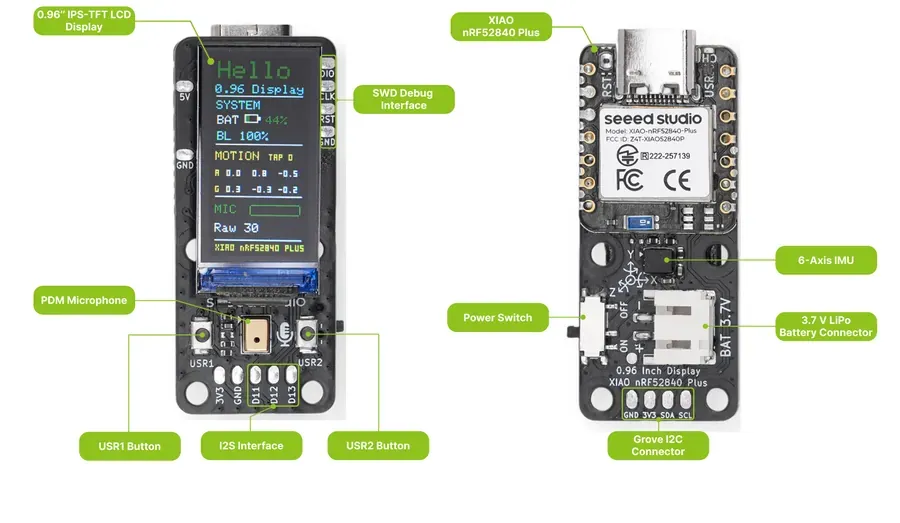
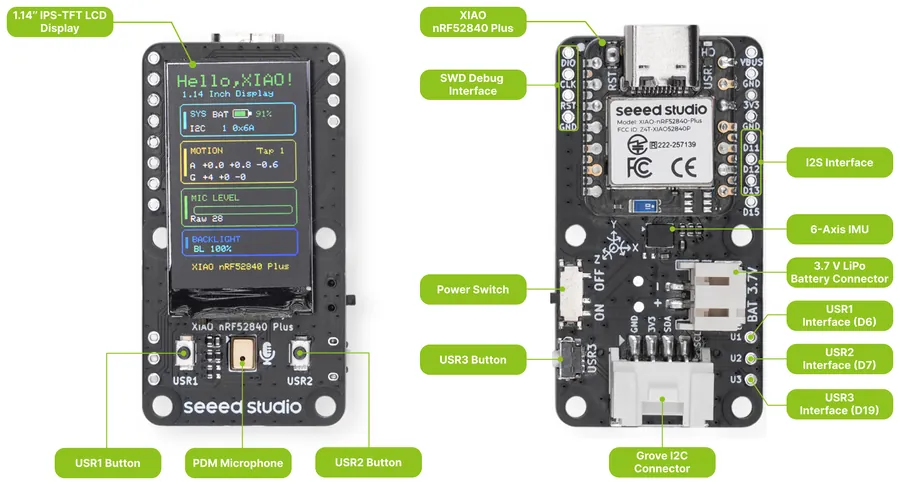
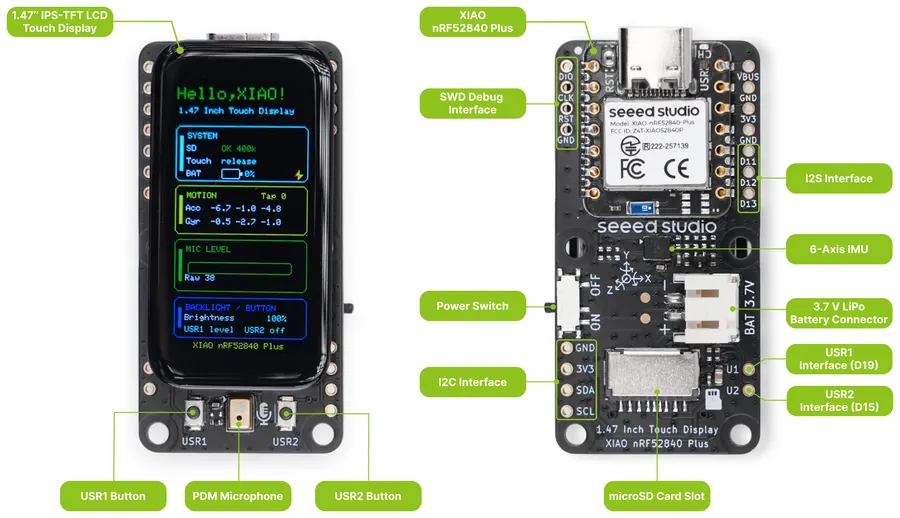
The Seeed Studio XIAO display gadgets are small carrier boards built around a XIAO Plus module, which is soldered on the board using the additional pads of the XIAO Plus form factor. They combine an IPS LCD with a PDM microphone, an LSM6DS3TR-C 6-axis IMU, user buttons and a LiPo battery connector with a power switch.
Three boards are available, each in a version powered by the XIAO nRF52840 Plus and a version powered by the XIAO ESP32S3 Plus. Both versions of a board connect the display, the buttons and the sensors to the same XIAO pin names, so the same shield describes both.
Shield |
Display |
Additional features |
|---|---|---|
|
0.96” 80x160 IPS LCD (ST7735) |
|
|
1.14” 135x240 IPS LCD (ST7789) |
Grove I2C connector, third user button |
|
1.47” 172x320 IPS LCD (JD9853A) |
AXS5106L capacitive touch controller, microSD card slot |
More information can be found on the XIAO Display Gadgets wiki [1].
Pin Assignments
XIAO pin |
0.96” display |
1.14” display |
1.47” display |
|---|---|---|---|
D0 |
Microphone clock |
Microphone clock |
Microphone clock |
D1 |
Microphone data |
Microphone data |
Microphone data |
D2 |
LCD SPI CS |
LCD SPI CS |
LCD SPI CS |
D3 |
LCD data/command |
LCD data/command |
LCD data/command |
D4, D5 |
I2C SDA, SCL |
I2C SDA, SCL |
I2C SDA, SCL |
D6 |
USR1 button |
USR1 button |
microSD SPI CS |
D7 |
USR2 button |
USR2 button |
Touch interrupt |
D8, D10 |
LCD SPI SCK, MOSI |
LCD SPI SCK, MOSI |
LCD and microSD SPI SCK, MOSI |
D9 |
microSD SPI MISO |
||
D14 |
IMU interrupt |
IMU interrupt |
IMU interrupt |
D15 |
USR2 button |
||
D17 |
LCD reset |
LCD reset |
LCD and touch reset |
D18 |
LCD backlight |
LCD backlight |
LCD backlight |
D19 |
USR3 button |
USR1 button |
The buttons are available through the sw0 to sw2 aliases, in the order of their USR
number, and report INPUT_KEY_0 to INPUT_KEY_2. The IMU is available through the
accel0 alias. The backlight is controlled by a fixed regulator enabled at boot.
The touch controller of the 1.47” display is the zephyr,touch chosen node. It shares its reset
line with the LCD controller, and this line has no pull-up resistor. Only the display driver drives
the line, so applications that use the touch controller must also enable the display driver with
CONFIG_DISPLAY.
The XIAO serial interface (xiao_serial) is disabled, as D6 and D7 are used by the boards.
Requirements
These shields can be used with a board that provides the XIAO Plus connector, see
seeed,xiao-plus-gpio. The boards are sold with the module soldered, so use the
board target that matches the module:
XIAO nRF52840 (Sense) Plus for the nRF52840 versions.
On the XIAO nRF52840 Plus, the shields also enable the PDM microphone, available through the
dmic0 alias, and set nfct-pins-as-gpios in the uicr node, as D14 and D15 are the NFC
pins of the nRF52840. This UICR setting is kept until the UICR is erased.
Programming
Set --shield to the shield matching the display when you invoke west build. For example,
to build the LVGL basic sample sample:
# From the root of the zephyr repository
west build -b xiao_nrf52840_plus --shield seeed_xiao_display_0_96 samples/subsys/display/lvgl
west flash
# From the root of the zephyr repository
west build -b xiao_nrf52840_plus --shield seeed_xiao_display_1_14 samples/subsys/display/lvgl
west flash
# From the root of the zephyr repository
west build -b xiao_nrf52840_plus --shield seeed_xiao_display_1_47 samples/subsys/display/lvgl
west flash