DH electronics DHSBC RS485 CAN Shield
Overview
The DHSBC RS485 CAN Shield is an expansion board that is compatible with the DHSBC STM32MP25. The shield can be easily connected to the respective single-board computer via the 40-pin expansion header without any additional effort. The board provides one RS485 interface (up to 500 kbit/s) and one CAN FD interface (up to 5 Mbit/s), which are routed to the outside via a picoMAX connector.
See DHSBC RS485 CAN Shield home page [1] and DHSBC RS485 CAN Shield user manual [2] for more information.
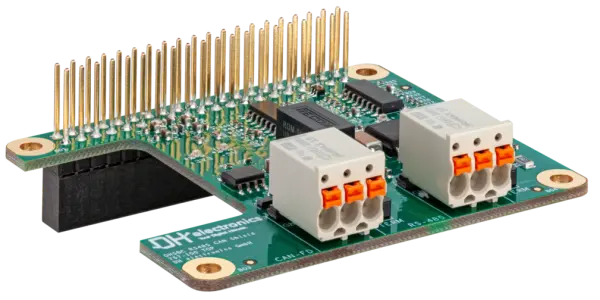
The RS485 part of the shield is modeled as a Modbus RTU serial backend
using the zephyr,modbus-serial compatible. Driver direction control is
connected to Raspberry Pi header signals.
GPIO17 (pin 5)asDE(driver enable)GPIO16 (pin 24)asRE(receiver enable, active low)
There is no dedicated CAN controller on the shield; it uses the integrated CAN controller on the SoC directly. The shield only has a CAN transceiver.
GPIO23 (pin 9)asCAN-TXGPIO24 (pin 10)asCAN-RX
Requirements
For the RS485 part, this shield requires a board that provides Raspberry Pi header aliases for:
raspberrypi_serialraspberrypi_header
For the CAN part, the CAN lines are not specified by the Raspberry Pi connector. Therefore CAN transceiver nodes must be provided by each board-specific overlay, see: boards/shields/dhsbc_rs485_can_shield/boards/stm32mp255c_dhsbc_stm32mp255cxx_m33.overlay
Socket selection is controlled by the board DTS aliases. See Shields for more details.
Programming
Set the shield to dhsbc_rs485_can_shield when invoking west build.
Example CAN
# From the root of the zephyr repository
west build -b stm32mp255c_dhsbc/stm32mp255cxx/m33 --shield dhsbc_rs485_can_shield samples/drivers/can/babbling
Example RS-485
The Modbus RTU server sample expects three LEDs but this shield does not have any. But the shield routes all Raspberry Pi pins to the outside so that LEDs can be connected to pin headers. The shield overlay defines LEDs on:
GPIO26 (pin 25)asLD1GPIO20 (pin 26)asLD2GPIO21 (pin 27)asLD3
The Modbus RTU server sample expects Arduino header in its app.overlay.
Therefore the app.overlay must be excluded from the build.
This is done by setting the DTC_OVERLAY_FILE to an empty string.
# From the root of the zephyr repository
west build -b stm32mp255c_dhsbc/stm32mp255cxx/m33 --shield dhsbc_rs485_can_shield samples/subsys/modbus/rtu_server -- -DDTC_OVERLAY_FILE=